Parallel and Channel-Sequential Processing
FACETpy supports multiple execution modes for multi-channel data. This guide explains when to use channel-sequential execution for memory efficiency and when to use parallelization for throughput.
Overview
FACETpy offers three execution strategies:
Channel-sequential execution (recommended default) - Run a full channel-wise processor chain per channel to minimize peak memory.
Processor-level parallelization - Split channels across CPU cores for maximum speed when sufficient RAM is available.
Pipeline-level parallelization - Process multiple files concurrently.
Rule of thumb: start with channel_sequential=True for large recordings,
upsampling-heavy pipelines, or constrained memory. Switch to
parallel=True when speed is the primary goal and memory is not a bottleneck.
Quick Start
Start with channel-sequential execution:
from facet.core import Pipeline
from facet.preprocessing import TriggerDetector
from facet.correction import AASCorrection

pipeline = Pipeline([
    TriggerDetector(regex=r"\b1\b"),
    AASCorrection(window_size=30)
])

# Recommended for memory-sensitive workloads
result = pipeline.run(channel_sequential=True)
If memory headroom is sufficient and you want maximum throughput:
# Use all CPU cores for eligible processors
result = pipeline.run(parallel=True, n_jobs=-1)
Channel-Sequential Execution
Why It Matters
Channel-sequential execution is a core FACETpy feature for memory-efficient processing. Instead of creating large intermediate arrays for all channels at once, FACETpy processes one data channel through the full local processor chain before moving to the next channel.
This is especially important for pipelines that contain upsampling and
artifact-correction steps (for example UpSample -> AASCorrection -> DownSample).
How It Works
With channel_sequential=True, consecutive processors marked as
channel_wise=True (or run_once=True) are merged into one per-channel
execution batch.
for each channel:
    channel -> HP-filter -> UpSample -> AAS -> DownSample -> store
Key properties:
Full high-sampling-rate intermediate data is not materialized for all channels at once.
run_once=Trueprocessors execute only for the first channel and their metadata is reused for the remaining channels.Non-data channels (for example stim/misc) are passed through or resampled as needed.
When to Prefer Channel-Sequential
Use channel_sequential=True when:
recordings are long,
channel count is high,
upsampling factors are high,
runs fail or become unstable due to memory pressure.
Enabling Channel-Sequential Execution
from facet import (
    Pipeline, Loader, EDFExporter,
    TriggerDetector, HighPassFilter, LowPassFilter,
    UpSample, DownSample, AASCorrection,
)

pipeline = Pipeline([
    Loader(path="data.edf", preload=True),
    TriggerDetector(regex=r"\b1\b"),    # serial/global step
    HighPassFilter(freq=1.0),           # channel-wise
    UpSample(factor=10),                # channel-wise
    AASCorrection(window_size=30),      # channel-wise
    DownSample(factor=10),              # channel-wise
    LowPassFilter(freq=70),             # channel-wise
    EDFExporter(path="corrected.edf", overwrite=True),
])

result = pipeline.run(channel_sequential=True)
Processor-Level Parallelization
How It Works
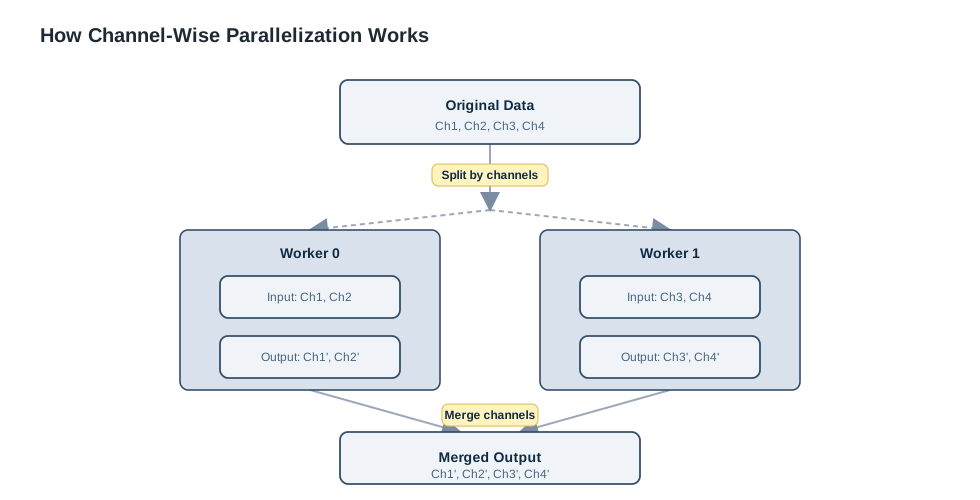
When a processor is marked as parallel_safe = True, the ParallelExecutor
can automatically split processing by channels:
Enabling Parallelization
from facet.core import Pipeline
from facet.io import Loader
from facet.preprocessing import TriggerDetector
from facet.correction import AASCorrection

pipeline = Pipeline([
    Loader(path="data.edf", preload=True),
    TriggerDetector(regex=r"\b1\b"),
    AASCorrection(window_size=30)  # parallel_safe = True
])

# Speed-oriented mode (higher memory usage than channel-sequential)
result = pipeline.run(
    parallel=True,  # Enable parallelization
    n_jobs=-1       # Use all CPU cores
)
Specifying Number of Jobs
# Use all cores
result = pipeline.run(parallel=True, n_jobs=-1)

# Use 4 cores
result = pipeline.run(parallel=True, n_jobs=4)

# Use half of available cores
import multiprocessing
n_cores = multiprocessing.cpu_count() // 2
result = pipeline.run(parallel=True, n_jobs=n_cores)
Which Processors Support Parallelization?
Check the parallel_safe flag:
from facet.correction import AASCorrection
from facet.preprocessing import TriggerDetector

aas = AASCorrection(window_size=30)
detector = TriggerDetector(regex=r"\b1\b")

print(f"AAS parallel safe: {aas.parallel_safe}")  # True
print(f"Detector parallel safe: {detector.parallel_safe}")  # False
Processors marked parallel_safe = True:
AASCorrectionPCACorrectionHighPassFilterLowPassFilterBandPassFilterNotchFilterUpSample/DownSample/ResampleTriggerAligner/SliceAligner/SubsampleAligner(withrun_once=True)
Processors that are NOT parallel safe:
TriggerDetector(operates on annotations)MissingTriggerDetector/QRSTriggerDetector(stateful trigger operations)ANCCorrection(currently markedparallel_safe = False)Loader/EDFExporter(I/O operations)SNRCalculator/RMSCalculator/MetricsReport(aggregation/reporting steps)
ParallelExecutor
The ParallelExecutor handles channel splitting automatically:
from facet.core import ParallelExecutor

# Manual usage (usually not needed)
executor = ParallelExecutor(n_jobs=4)
result_context = executor.execute(processor, input_context)
Channel-wise Execution
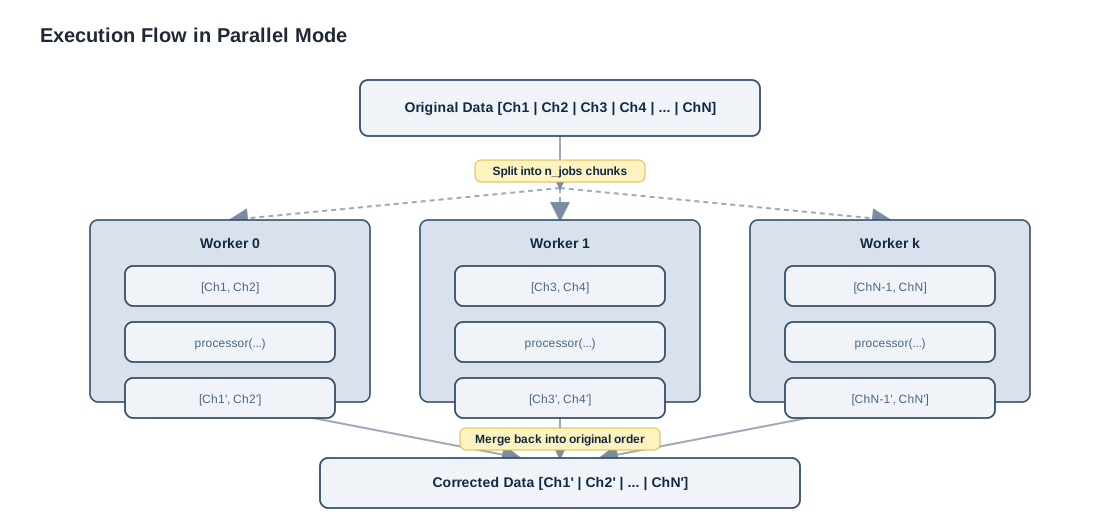
Channel-wise execution is the primary parallelisation strategy in FACETpy.
Each EEG channel (or a group of channels) is processed independently in its
own worker, and the results are merged back into a single
ProcessingContext before the next pipeline step.
Opting In
A processor opts in by setting two class-level flags:
class MyProcessor(Processor):
    parallel_safe = True   # no cross-channel dependencies; safe for worker processes
    channel_wise  = True   # can operate on a single-channel subset context
parallel_safe and channel_wise are independent concepts.
channel_wise is the flag used by both the parallel executor (parallel=True)
and the channel-sequential executor (channel_sequential=True).
In contrast, parallel_safe only affects multiprocessing mode.
Built-in processors that are channel-wise safe:
Processor |
Why it is safe |
|---|---|
|
Artifact template is computed per channel independently |
|
PCA is applied per channel without cross-channel reads |
|
FIR/IIR filters operate on each channel’s time series in isolation |
|
Resampling is applied independently to each channel |
|
Reads one reference channel; has |
Processors that are not channel-wise:
Processor |
Why it is not channel-wise |
|---|---|
|
Reads annotations shared across all channels |
|
File I/O is inherently serial |
|
Aggregates across channels; splitting would produce partial metrics |
Execution Flow
Enabling it via the Pipeline
Pass parallel=True to Pipeline.run(...) for speed, or
channel_sequential=True for memory-optimized per-channel execution.
Processors that do not set channel_wise = True are silently executed
serially — no special handling required.
from facet import (
    Pipeline, Loader, EDFExporter,
    TriggerDetector, HighPassFilter, LowPassFilter,
    UpSample, DownSample, AASCorrection,
)

pipeline = Pipeline([
    Loader(path="data.edf", preload=True),
    TriggerDetector(regex=r"\b1\b"),   # serial
    HighPassFilter(freq=1.0),           # channel-wise
    UpSample(factor=10),                # channel-wise
    AASCorrection(window_size=30),      # channel-wise
    DownSample(factor=10),              # channel-wise
    LowPassFilter(freq=70),             # channel-wise
    EDFExporter(path="corrected.edf", overwrite=True),
])

result = pipeline.run(channel_sequential=True)    # memory-optimized default
result = pipeline.run(parallel=True, n_jobs=-1)   # speed-oriented alternative
Choosing a Backend
You can also use ParallelExecutor directly to
pick a specific backend:
from facet.core import ParallelExecutor

executor = ParallelExecutor(
    n_jobs   = 4,
    backend  = "multiprocessing",   # "multiprocessing" | "threading" | "serial"
    verbose  = True,
)
result_context = executor.execute(processor, context)
Backend |
When to use |
|---|---|
|
Default. Each worker is a separate process — true CPU parallelism. Best for compute-heavy channel-wise processors (AAS, PCA, filtering, resampling). |
|
Shared memory, lower startup cost. Limited by the GIL for pure-Python code, but can help for NumPy/C-extension-heavy processors. |
|
Disables splitting. Useful for debugging or profiling to establish a baseline without parallelisation overhead. |
Writing a Custom Channel-wise Processor
Any processor whose computation for channel A is independent of channel B can opt in. A minimal example:
import numpy as np
from facet.core import Processor, ProcessingContext

class ChannelZScoreNormalizer(Processor):
    """Per-channel z-score normalisation — parallel-safe."""

    name        = "channel_zscore_normalizer"
    description = "Normalise each channel to zero mean and unit variance"

    requires_raw  = True
    modifies_raw  = True
    parallel_safe = True
    channel_wise  = True

    def process(self, context: ProcessingContext) -> ProcessingContext:
        raw  = context.get_raw().copy()
        data = raw._data                           # [n_channels, n_samples]

        mean = data.mean(axis=1, keepdims=True)
        std  = data.std(axis=1, keepdims=True)
        std  = np.where(std == 0, 1.0, std)        # guard against flat channels

        raw._data = (data - mean) / std
        return context.with_raw(raw)
This processor will be split channel-wise by ParallelExecutor exactly like
AASCorrection. No other changes are required.
See examples/channelwise_execution.py for a complete runnable example
including benchmark helpers and backend comparisons.
Pipeline-Level Parallelization
Process Multiple Files
Use Python’s concurrent.futures to process multiple files in parallel:
import concurrent.futures
from pathlib import Path

def process_file(input_path):
    """Process a single file."""
    output_path = f"corrected/{Path(input_path).stem}_corrected.edf"

    pipeline = Pipeline([
        Loader(path=input_path, preload=True),
        TriggerDetector(regex=r"\b1\b"),
        AASCorrection(window_size=30),
        EDFExporter(path=output_path, overwrite=True)
    ])

    return pipeline.run()

# Process multiple files in parallel
input_files = list(Path("data").glob("*.edf"))

with concurrent.futures.ProcessPoolExecutor(max_workers=4) as executor:
    results = list(executor.map(process_file, input_files))

# Check results
for input_file, result in zip(input_files, results):
    status = "✓" if result.success else "✗"
    print(f"{status} {input_file.name}")
Thread Pool vs Process Pool
ThreadPoolExecutor - Faster startup, shared memory:
with concurrent.futures.ThreadPoolExecutor(max_workers=4) as executor:
    results = executor.map(process_file, files)
ProcessPoolExecutor - True parallelism, isolated memory:
with concurrent.futures.ProcessPoolExecutor(max_workers=4) as executor:
    results = executor.map(process_file, files)
Use ProcessPoolExecutor for CPU-intensive work (recommended).
Batch Processing Example
from concurrent.futures import ProcessPoolExecutor, as_completed
from tqdm import tqdm

def process_with_progress(input_files, n_workers=4):
    """Process files with progress bar."""
    results = {}

    with ProcessPoolExecutor(max_workers=n_workers) as executor:
        # Submit all jobs
        future_to_file = {
            executor.submit(process_file, f): f
            for f in input_files
        }

        # Process as they complete
        for future in tqdm(as_completed(future_to_file),
                          total=len(input_files),
                          desc="Processing"):
            input_file = future_to_file[future]
            try:
                result = future.result()
                results[input_file] = result
            except Exception as e:
                print(f"Error processing {input_file}: {e}")
                results[input_file] = None

    return results

# Use it
input_files = list(Path("data").glob("*.edf"))
results = process_with_progress(input_files, n_workers=4)
Performance Considerations
When to Use Parallelization
Good use cases:
Multi-channel data (>10 channels)
Long recordings (>10 minutes)
Batch processing multiple files
CPU-intensive operations (AAS, ANC, PCA)
Not beneficial:
Single-channel data
Very short recordings (<1 minute)
Single file processing with few channels
I/O-bound operations
For memory-bound pipelines, prefer channel_sequential=True instead of
parallel=True.
Optimal Number of Workers
import multiprocessing

# Get CPU count
n_cpus = multiprocessing.cpu_count()
print(f"Available CPUs: {n_cpus}")

# General guidelines:
# - Processor-level: Use all cores (n_jobs=-1)
# - Pipeline-level: Use n_cpus - 1 (leave one for system)

# For mixed workload
n_pipeline_workers = max(1, n_cpus - 1)
n_processor_jobs = 2  # Use fewer per-file to allow more files
Memory Usage
Parallel processing increases memory usage:
# Memory per worker ≈ raw data size + processing overhead

# Example: 32 channels, 5000 Hz, 10 min recording
# Memory ≈ 32 * 5000 * 600 * 8 bytes ≈ 750 MB per worker

# With 4 workers: 4 * 750 MB = 3 GB

# Monitor memory
import psutil
print(f"Available memory: {psutil.virtual_memory().available / 1e9:.1f} GB")
For the same processor chain, channel_sequential=True typically lowers
peak memory because only one channel’s large intermediate representation is
kept in memory at a time.
Overhead
Parallelization has overhead:
Starting worker processes
Splitting/merging data
Inter-process communication
Only worth it if processing time >> overhead.
# Rule of thumb:
# Parallelize if processing time > 10 seconds per file
Benchmarking
Compare Performance
import time

# Serial processing
start = time.time()
result = pipeline.run(parallel=False, channel_sequential=False)
serial_time = time.time() - start

# Channel-sequential processing (memory-optimized)
start = time.time()
result = pipeline.run(channel_sequential=True)
channel_seq_time = time.time() - start

# Parallel processing
start = time.time()
result = pipeline.run(parallel=True, n_jobs=-1)
parallel_time = time.time() - start

# Compare runtimes
print(f"Serial:            {serial_time:.2f}s")
print(f"Channel-sequential:{channel_seq_time:.2f}s")
print(f"Parallel:          {parallel_time:.2f}s")
Scaling Analysis
def benchmark_scaling(pipeline, context, max_workers=8):
    """Benchmark scaling with different worker counts."""
    results = {}

    for n_workers in range(1, max_workers + 1):
        start = time.time()
        result = pipeline.run(
            initial_context=context,
            parallel=True,
            n_jobs=n_workers
        )
        elapsed = time.time() - start
        results[n_workers] = elapsed

    return results

# Run benchmark
scaling = benchmark_scaling(pipeline, context)

# Plot results
import matplotlib.pyplot as plt

workers = list(scaling.keys())
times = list(scaling.values())

plt.plot(workers, times, marker='o')
plt.xlabel('Number of Workers')
plt.ylabel('Processing Time (s)')
plt.title('Parallel Scaling')
plt.grid(True)
plt.show()
Best Practices
Profile First
Measure before optimizing:
# Time your pipeline
import time
start = time.time()
result = pipeline.run()
print(f"Time: {time.time() - start:.2f}s")
Start with Memory-Safe Mode
Use channel-sequential first, then scale to parallel if needed:
# Recommended starting point
result = pipeline.run(channel_sequential=True)

# If runtime is the bottleneck and memory is sufficient:
result = pipeline.run(parallel=True, n_jobs=-1)
Monitor Resources
Watch CPU and memory:
import psutil

# Before processing
cpu_percent = psutil.cpu_percent(interval=1)
mem = psutil.virtual_memory()
print(f"CPU: {cpu_percent}%, Memory: {mem.percent}%")
Handle Errors
Parallel processing can hide errors:
try:
    result = pipeline.run(parallel=True, n_jobs=-1)
    if not result.success:
        print(f"Pipeline failed: {result.error}")
except Exception as e:
    print(f"Unexpected error: {e}")
Batch Appropriately
Group files by size:
# Process large files one at a time
large_files = [f for f in files if f.stat().st_size > 1e9]

# Process small files in parallel
small_files = [f for f in files if f.stat().st_size <= 1e9]
Troubleshooting
Parallel Processing Not Working
Check if processors support parallelization:
for proc in pipeline.processors:
    if not proc.parallel_safe:
        print(f"{proc.name} is not parallel safe")
Out of Memory Errors
First switch to channel-sequential mode. If needed, then reduce workers:
# Preferred fix for memory pressure
result = pipeline.run(channel_sequential=True)

# Use fewer workers
result = pipeline.run(parallel=True, n_jobs=2)

# Or disable both advanced modes
result = pipeline.run(parallel=False, channel_sequential=False)
Slower with Parallelization
Overhead may exceed benefit:
# Use simple serial mode for very small datasets
if n_channels < 10 or duration < 60:
    result = pipeline.run(parallel=False, channel_sequential=False)
# Use memory-optimized channel-sequential mode for larger but memory-bound data
elif memory_limited:
    result = pipeline.run(channel_sequential=True)
else:
    result = pipeline.run(parallel=True, n_jobs=-1)
Advanced Topics
Custom Parallel Executors
Create custom parallel execution:
from facet.core import ParallelExecutor

class CustomExecutor(ParallelExecutor):
    def __init__(self, n_jobs=-1, backend='multiprocessing'):
        super().__init__(n_jobs=n_jobs)
        self.backend = backend

    def execute(self, processor, context):
        # Custom parallel execution logic
        return super().execute(processor, context)
GPU Acceleration
FACETpy doesn’t currently support GPU acceleration, but you can create custom processors that use GPU libraries:
from facet.core import Processor
import torch  # or cupy, jax, etc.

class GPUProcessor(Processor):
    name = "gpu_processor"
    parallel_safe = False  # GPU handles parallelization

    def process(self, context):
        raw = context.get_raw()
        data = torch.from_numpy(raw._data).cuda()

        # GPU processing
        result = self.gpu_function(data)

        # Copy back to CPU
        raw._data = result.cpu().numpy()
        return context.with_raw(raw)
Distributed Processing
For cluster environments, use Dask:
from dask.distributed import Client
from dask import delayed

# Connect to cluster
client = Client('scheduler-address:8786')

# Create delayed tasks
tasks = [delayed(process_file)(f) for f in files]

# Compute in parallel
results = client.compute(tasks)
Next Steps
Learn about Pipeline Guide for workflow composition
Explore Processors Guide for available operations
Check Custom Processors for creating parallel-safe processors
See Examples for complete examples