Custom Processors
This guide shows you how to create custom processors to extend FACETpy’s functionality.
Why Create Custom Processors?
Create custom processors when you need to:
Implement a new correction algorithm
Add domain-specific preprocessing
Integrate external tools
Customize existing workflows
Share reproducible processing steps
Basic Custom Processor
Minimal Example
Here’s the simplest custom processor:
from facet.core import Processor, ProcessingContext

class MyProcessor(Processor):
    """My custom processor."""

    name = "my_processor"
    description = "Does something useful"

    def __init__(self, param1, param2=10):
        """Initialize with parameters."""
        self.param1 = param1
        self.param2 = param2
        super().__init__()

    def process(self, context: ProcessingContext) -> ProcessingContext:
        """Main processing logic."""
        # Get data
        raw = context.get_raw()

        # Do something with the data
        # ... your processing here ...

        # Return new context with modified data
        return context.with_raw(raw)

# Use it
processor = MyProcessor(param1="value", param2=20)
output_context = processor.execute(input_context)
Key Components
Every processor needs:
Name - Unique identifier
process() method - Main processing logic
Parameters - Configuration via
__init__Call super().__init__() - Initialize base class
Processor Template
Complete Template
Here’s a complete processor template with all features:
from facet.core import Processor, ProcessingContext, ProcessorValidationError
from typing import Optional
import numpy as np

class TemplateProcessor(Processor):
    """
    Template for creating custom processors.

    This processor demonstrates all standard features and best practices.

    Parameters
    ----------
    param1 : str
        Description of param1
    param2 : float, optional
        Description of param2 (default: 1.0)
    param3 : bool, optional
        Description of param3 (default: True)
    """

    # Class attributes
    name = "template_processor"
    description = "Template processor showing best practices"
    version = "1.0.0"

    # Requirements
    requires_raw = True
    requires_triggers = False  # Set True if needed
    modifies_raw = True
    parallel_safe = True  # Set False if not thread-safe

    def __init__(
        self,
        param1: str,
        param2: float = 1.0,
        param3: bool = True
    ):
        """
        Initialize the processor.

        Parameters
        ----------
        param1 : str
            Description of param1
        param2 : float, optional
            Description of param2 (default: 1.0)
        param3 : bool, optional
            Description of param3 (default: True)
        """
        self.param1 = param1
        self.param2 = param2
        self.param3 = param3
        super().__init__()

    def validate(self, context: ProcessingContext) -> None:
        """
        Validate prerequisites before processing.

        Parameters
        ----------
        context : ProcessingContext
            Input context to validate

        Raises
        ------
        ProcessorValidationError
            If prerequisites are not met
        """
        # Call parent validation (checks requires_raw, requires_triggers)
        super().validate(context)

        # Add custom validation
        if self.param3 and not context.has_triggers():
            raise ProcessorValidationError(
                f"{self.name} requires triggers when param3=True"
            )

        # Validate data properties
        raw = context.get_raw()
        if len(raw.ch_names) < 1:
            raise ProcessorValidationError("At least one channel required")

    def process(self, context: ProcessingContext) -> ProcessingContext:
        """
        Process the context.

        Parameters
        ----------
        context : ProcessingContext
            Input processing context

        Returns
        -------
        ProcessingContext
            Output processing context with processed data
        """
        # Get data
        raw = context.get_raw()
        data = raw.get_data(copy=False)  # numpy array

        # Your processing logic here
        processed_data = self._process_data(data)

        # Create modified raw
        raw_processed = raw.copy()
        raw_processed._data = processed_data

        # Return new context
        return context.with_raw(raw_processed)

    def _process_data(self, data: np.ndarray) -> np.ndarray:
        """
        Internal method for processing data.

        Parameters
        ----------
        data : np.ndarray
            Input data array (channels × samples)

        Returns
        -------
        np.ndarray
            Processed data array
        """
        # Implement your algorithm
        processed = data * self.param2

        if self.param3:
            processed = np.clip(processed, -1, 1)

        return processed
Practical Examples
Example 1: Channel Selection
Select specific channels:
from facet.core import Processor, ProcessingContext

class ChannelSelector(Processor):
    """Select specific channels from the data."""

    name = "channel_selector"
    description = "Select specific channels"
    requires_raw = True
    modifies_raw = True

    def __init__(self, channels):
        """
        Initialize with channel names to keep.

        Parameters
        ----------
        channels : list of str
            Channel names to select
        """
        self.channels = channels
        super().__init__()

    def validate(self, context):
        super().validate(context)

        raw = context.get_raw()
        missing = set(self.channels) - set(raw.ch_names)
        if missing:
            raise ProcessorValidationError(
                f"Channels not found: {missing}"
            )

    def process(self, context):
        raw = context.get_raw()

        # Pick channels
        raw_selected = raw.copy().pick_channels(self.channels)

        return context.with_raw(raw_selected)

# Use it
selector = ChannelSelector(channels=['Fz', 'Cz', 'Pz'])
context = selector.execute(context)
Example 2: Artifact Marker
Mark artifact segments:
import numpy as np
from mne import Annotations

class ArtifactMarker(Processor):
    """Mark high-amplitude artifacts."""

    name = "artifact_marker"
    description = "Mark artifacts based on amplitude threshold"
    requires_raw = True
    modifies_raw = True

    def __init__(self, threshold=100e-6, window_size=1.0):
        """
        Initialize marker.

        Parameters
        ----------
        threshold : float
            Amplitude threshold in volts (default: 100 µV)
        window_size : float
            Window size in seconds (default: 1.0)
        """
        self.threshold = threshold
        self.window_size = window_size
        super().__init__()

    def process(self, context):
        raw = context.get_raw()
        data = raw.get_data(copy=False)
        sfreq = raw.info['sfreq']

        # Find high-amplitude samples
        window_samples = int(self.window_size * sfreq)
        max_amplitude = np.max(np.abs(data), axis=0)

        # Find artifact segments
        artifacts = max_amplitude > self.threshold
        artifact_starts = np.where(np.diff(artifacts.astype(int)) == 1)[0]
        artifact_stops = np.where(np.diff(artifacts.astype(int)) == -1)[0]

        # Create annotations
        onsets = artifact_starts / sfreq
        durations = (artifact_stops - artifact_starts) / sfreq

        annotations = Annotations(
            onset=onsets,
            duration=durations,
            description=['BAD_artifact'] * len(onsets)
        )

        # Add to raw
        raw_marked = raw.copy()
        raw_marked.set_annotations(annotations)

        return context.with_raw(raw_marked)
Example 3: Custom Filter
Implement a custom filtering algorithm:
from scipy import signal

class CustomFilter(Processor):
    """Apply custom filter to data."""

    name = "custom_filter"
    description = "Custom filtering algorithm"
    requires_raw = True
    modifies_raw = True
    parallel_safe = True

    def __init__(self, cutoff_freq, filter_type='butterworth', order=5):
        """
        Initialize filter.

        Parameters
        ----------
        cutoff_freq : float
            Cutoff frequency in Hz
        filter_type : str
            Filter type (default: 'butterworth')
        order : int
            Filter order (default: 5)
        """
        self.cutoff_freq = cutoff_freq
        self.filter_type = filter_type
        self.order = order
        super().__init__()

    def process(self, context):
        raw = context.get_raw()
        data = raw.get_data(copy=False)
        sfreq = raw.info['sfreq']

        # Design filter
        sos = signal.butter(
            self.order,
            self.cutoff_freq,
            btype='high',
            fs=sfreq,
            output='sos'
        )

        # Apply filter to each channel
        filtered_data = np.zeros_like(data)
        for i, channel_data in enumerate(data):
            filtered_data[i] = signal.sosfiltfilt(sos, channel_data)

        # Create new raw
        raw_filtered = raw.copy()
        raw_filtered._data = filtered_data

        return context.with_raw(raw_filtered)
Example 4: Metadata Enrichment
Add custom metadata:
class MetadataEnricher(Processor):
    """Add custom metadata to context."""

    name = "metadata_enricher"
    description = "Add custom metadata"
    requires_raw = True
    modifies_raw = False  # Doesn't modify raw data

    def __init__(self, key, value):
        """
        Initialize with metadata to add.

        Parameters
        ----------
        key : str
            Metadata key
        value : any
            Metadata value
        """
        self.key = key
        self.value = value
        super().__init__()

    def process(self, context):
        # Get metadata
        metadata = context.metadata.copy()

        # Add custom data
        metadata.custom[self.key] = self.value

        # Return context with updated metadata
        return context.with_metadata(metadata)

# Use it
enricher = MetadataEnricher(key="subject_id", value="SUB001")
context = enricher.execute(context)
Registration
Registering Processors
Register your processor for discovery:
from facet.core import register_processor

@register_processor
class MyProcessor(Processor):
    name = "my_processor"
    # ... rest of implementation

# Or register manually
from facet.core import ProcessorRegistry

registry = ProcessorRegistry.get_instance()
registry.register("my_processor", MyProcessor)
Using Registered Processors
from facet.core import get_processor

# Get processor class by name
ProcessorClass = get_processor("my_processor")

# Instantiate
processor = ProcessorClass(param1="value")
Validation
Best Practices
Always validate prerequisites:
def validate(self, context):
    """Validate prerequisites."""
    # Call parent validation first
    super().validate(context)

    # Check for required data
    if not context.has_triggers():
        raise ProcessorValidationError("Triggers required")

    # Validate parameters
    if self.window_size < 1:
        raise ProcessorValidationError("window_size must be >= 1")

    # Check data properties
    raw = context.get_raw()
    if raw.info['sfreq'] < 100:
        raise ProcessorValidationError("Sampling rate must be >= 100 Hz")
Error Handling
Handling Errors Gracefully
def process(self, context):
    """Process with error handling."""
    try:
        raw = context.get_raw()
        data = raw.get_data(copy=False)

        # Processing that might fail
        result = self._process_data(data)

        raw_processed = raw.copy()
        raw_processed._data = result

        return context.with_raw(raw_processed)

    except ValueError as e:
        raise ProcessorValidationError(
            f"Invalid data for {self.name}: {e}"
        )
    except Exception as e:
        # Re-raise with context
        raise RuntimeError(
            f"Error in {self.name}: {e}"
        ) from e
Testing Custom Processors
Unit Tests
import pytest
import numpy as np
from facet.core import ProcessingContext

class TestMyProcessor:
    """Tests for MyProcessor."""

    def test_initialization(self):
        """Test processor initialization."""
        processor = MyProcessor(param1="value")
        assert processor.param1 == "value"

    def test_process(self, sample_context):
        """Test processing."""
        processor = MyProcessor(param1="value")
        result = processor.execute(sample_context)

        assert result is not None
        assert result.get_raw() is not None

    def test_validation(self, sample_raw):
        """Test validation."""
        processor = MyProcessor(param1="value")
        context = ProcessingContext(raw=sample_raw)

        # Should not raise
        processor.validate(context)

    def test_validation_failure(self):
        """Test validation failure."""
        processor = MyProcessor(param1="value")
        context = None  # Missing context should fail for requires_raw processors

        with pytest.raises(ProcessorValidationError):
            processor.execute(context)
Integration Tests
def test_in_pipeline(sample_edf_file):
    """Test processor in complete pipeline."""
    from facet.io import Loader
    from facet.core import Pipeline

    pipeline = Pipeline([
        Loader(path=str(sample_edf_file)),
        MyProcessor(param1="value"),
        # ... other processors
    ])

    result = pipeline.run()
    assert result.success is True
Performance Optimization
Making Processors Parallel-Safe
To enable parallelization, ensure your processor is thread-safe:
class ParallelSafeProcessor(Processor):
    """Processor that can be parallelized."""

    name = "parallel_safe_processor"
    parallel_safe = True  # Enable parallelization

    def process(self, context):
        """Process with no shared state."""
        # ✓ Good: No shared mutable state
        raw = context.get_raw()
        data = raw.get_data(copy=False)

        # Process data independently
        result = self._process_channel(data)

        # ✗ Bad: Don't modify class attributes
        # self.cache = result  # NOT thread-safe!

        return context.with_raw(raw.copy())
Vectorization
Use NumPy vectorization for speed:
def process(self, context):
    """Vectorized processing."""
    raw = context.get_raw()
    data = raw.get_data(copy=False)

    # ✓ Good: Vectorized
    result = np.sqrt(data ** 2 + 1)

    # ✗ Bad: Python loops
    # result = np.zeros_like(data)
    # for i in range(data.shape[0]):
    #     for j in range(data.shape[1]):
    #         result[i, j] = np.sqrt(data[i, j] ** 2 + 1)

    raw_processed = raw.copy()
    raw_processed._data = result
    return context.with_raw(raw_processed)
Advanced Topics
Stateful Processors
Some processors need to maintain state:
class StatefulProcessor(Processor):
    """Processor with internal state."""

    name = "stateful_processor"
    parallel_safe = False  # State makes it not thread-safe

    def __init__(self):
        self.history = []
        super().__init__()

    def process(self, context):
        raw = context.get_raw()

        # Update state
        self.history.append(raw.times[-1])

        # Use state in processing
        if len(self.history) > 1:
            print(f"Processed {len(self.history)} files")

        return context
Chaining Custom Processors
# Create sequence
from facet.core import SequenceProcessor

custom_sequence = SequenceProcessor([
    ChannelSelector(channels=['Fz', 'Cz']),
    ArtifactMarker(threshold=100e-6),
    CustomFilter(cutoff_freq=1.0)
])

# Use in pipeline
pipeline = Pipeline([
    Loader(path="data.edf"),
    custom_sequence,
    EDFExporter(path="output.edf")
])
Documentation
Documenting Your Processor
Use NumPy-style docstrings:
class WellDocumented(Processor):
    """
    One-line description.

    Detailed description of what the processor does,
    when to use it, and any important notes.

    Parameters
    ----------
    param1 : str
        Description of param1
    param2 : float, optional
        Description of param2 (default: 1.0)

    Attributes
    ----------
    name : str
        Processor name
    description : str
        Short description

    Examples
    --------
    >>> processor = WellDocumented(param1="value")
    >>> result = processor.execute(context)

    Notes
    -----
    Any important implementation notes or references.

    References
    ----------
    .. [1] Author et al. "Paper Title", Journal, 2024.
    """
Sharing Processors
Package Your Processor
Create a Python package:
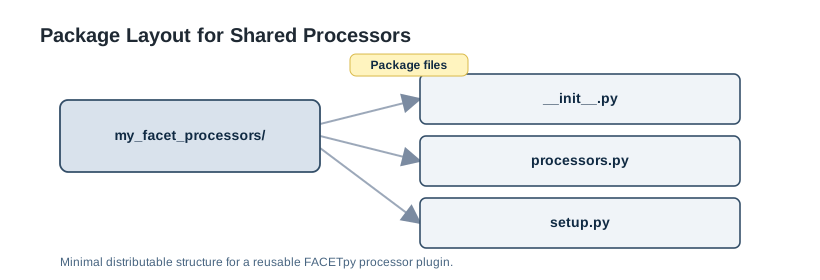
# processors.py
from facet.core import Processor, register_processor

@register_processor
class MyProcessor(Processor):
    name = "my_processor"
    # ... implementation

# __init__.py
from .processors import MyProcessor

__all__ = ['MyProcessor']
Install and Use
pip install my_facet_processors
# Now available in registry
from facet.core import get_processor

MyProcessor = get_processor("my_processor")
Next Steps
Review Processors Guide for built-in examples
Learn about Pipeline Guide for integration
Check Parallel and Channel-Sequential Processing for performance
See Core API for complete API reference